Benefits of Having a Custom CRM: How It Helps Businesses Improve Customer Relationships and Grow Faster
In today’s competitive business environment, managing customer relationships effectively is essential for long-term success. Whether you run a small business, a growing startup, a service-based company, or an established organisation, keeping track of customer information, sales activities, follow-ups, and business operations can become challenging as your business grows.
Many businesses initially manage their customers through spreadsheets, notebooks, emails, and messaging applications. While these methods may work in the beginning, they often become difficult to manage when customer inquiries increase, multiple employees handle sales, or business operations become more complex.
This is where a Customer Relationship Management (CRM) system becomes valuable.
A CRM system helps businesses organise customer information, manage sales activities, improve communication, and build stronger relationships with customers. However, every business has different requirements. A standard CRM software may provide useful features, but it may not always match the exact workflow, operational needs, or growth objectives of a particular business.
A custom CRM offers a more flexible approach by allowing businesses to develop a system according to their specific requirements.
In this guide, we will explore the benefits of having a custom CRM, how it works, which businesses can benefit from it, and how it can support better business management, customer satisfaction, and long-term growth.
What Is a Custom CRM?
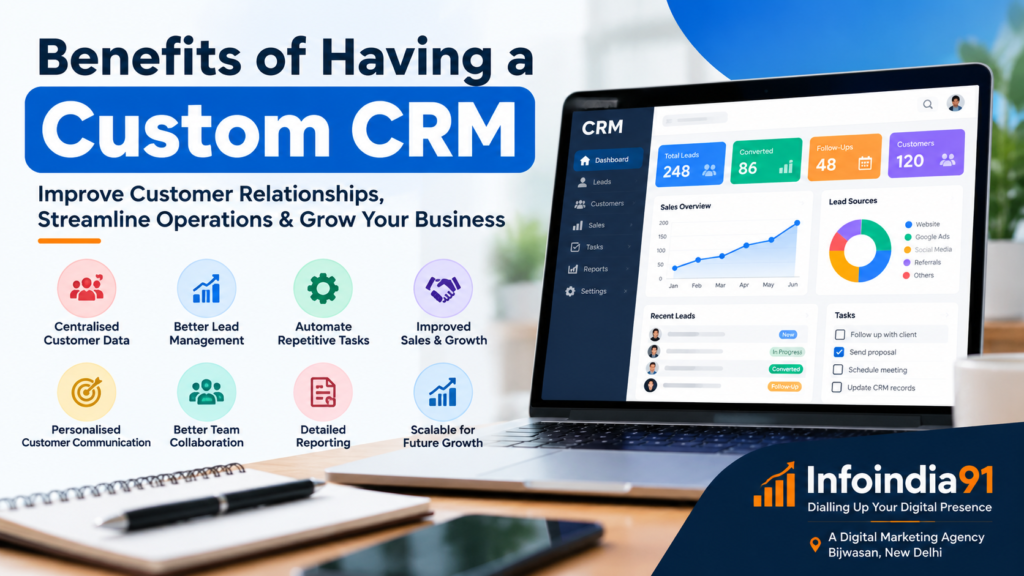
A Custom Customer Relationship Management (CRM) system is software designed and developed according to the specific needs of a business. It helps organisations manage customer information, track leads, monitor sales activities, automate routine tasks, and maintain better communication with customers.
Unlike ready-made CRM software, which generally provides standard features for a wide range of businesses, a custom CRM can be developed around your company’s individual processes.
For example, a real estate company may need property inquiry management, site visit scheduling, and booking follow-ups. A digital marketing agency may require lead tracking, client onboarding, campaign management, and reporting. Similarly, an educational institute may need student inquiry management, admission tracking, fee reminders, and course follow-ups.
A custom CRM can be designed to support these different requirements within a single system.
Custom CRM vs. Standard CRM Software
| Feature | Standard CRM | Custom CRM |
|---|---|---|
| Features | Predefined features | Features based on business needs |
| Workflow | Follows available processes | Can match existing workflows |
| Flexibility | Depends on the software | Can be developed for specific requirements |
| Integration | Depends on available integrations | Can support selected integrations |
| Cost | Subscription or licensing fees | Development and ongoing maintenance costs |
| Scalability | Depends on the provider’s plans | Can be expanded according to the system design |
Both options can be useful. A standard CRM may be suitable for businesses with common requirements and limited customisation needs. A custom CRM may be worth considering when a business needs specialised workflows, greater control over its system, or integration with existing business processes.
The right choice depends on the organisation’s budget, requirements, technical resources, and future plans.
10 Major Benefits of Having a Custom CRM
1. Centralised Customer Information
One of the most important benefits of a custom CRM is that it keeps customer information organised in one central location.
Many businesses receive customer inquiries through different channels, including:
- Website contact forms
- Phone calls
- WhatsApp messages
- Social media platforms
- Email inquiries
- Online advertisements
- Customer referrals
When information is stored separately, employees may struggle to find previous conversations, contact details, requirements, and follow-up records.
A CRM system can bring this information together in a structured format.
For example, when a customer contacts a business about a service, the team can record the customer’s name, contact details, requirements, inquiry source, previous communication, and current status.
This makes it easier for employees to understand the customer’s journey and provide relevant assistance.
Business benefit: Better organisation, improved communication, and reduced chances of losing important customer information.
2. Better Lead Management and Follow-Ups
Generating leads is only one part of business growth. Managing those leads properly is equally important.
A business may receive hundreds of inquiries through Google Ads, Meta Ads, its website, or social media. Without a proper system, some inquiries may remain unanswered, follow-ups may be delayed, and potential customers may lose interest.
A custom CRM can help businesses manage leads through different stages.
For example:
Example lead management process
New Inquiry
Customer submits a form or contacts the business.
Lead Assigned
An employee is assigned to handle the inquiry.
Follow-Up and Discussion
The team contacts the customer and records progress.
Converted or Closed
The inquiry is converted into a customer or marked as closed.
Businesses can also use reminders, task assignments, and follow-up schedules to ensure that inquiries receive timely attention.
For example, a training institute can track whether a student has been contacted, whether course details have been shared, and whether the student is interested in admission.
This process helps create a more organised sales environment.
3. Improved Sales Tracking and Business Performance
A custom CRM can provide a clear overview of sales activities and business performance.
Instead of depending entirely on manual reports, business owners and managers can review information such as:
- Total inquiries received
- Number of active leads
- Leads assigned to each employee
- Follow-ups completed
- Sales opportunities in progress
- Converted customers
- Lost opportunities
- Revenue generated from sales
These insights can help management understand where opportunities are being created and where improvements may be needed.
For example, if a business receives many inquiries but converts only a small percentage into customers, management can investigate possible reasons.
The issue may involve delayed follow-ups, unsuitable targeting, pricing concerns, or ineffective communication.
A CRM does not automatically solve every sales problem, but it provides organised information that supports better decision-making.
4. Automation of Repetitive Business Tasks
Many business activities are repetitive and time-consuming.
Employees may spend considerable time assigning leads, sending reminders, updating customer records, preparing reports, and maintaining spreadsheets.
A custom CRM can automate selected tasks according to the business workflow.
Some examples include:
Automatic Follow-Up Reminders
Remind employees when a customer needs to be contacted again.
Automatic Lead Assignment
Assign incoming inquiries to the appropriate sales representative.
Customer Notifications
Send selected email or messaging notifications when supported integrations are configured.
Automated Reports
Generate regular reports using available CRM data.
Automation can reduce manual work and help employees focus more on customer communication, sales, and other important responsibilities.
However, automation should be designed carefully. Poorly configured workflows may send incorrect notifications or create unnecessary tasks.
5. Personalised Customer Communication
Customers appreciate communication that is relevant to their needs.
A custom CRM can help businesses understand customer preferences, previous interactions, service history, and requirements.
For example, if a customer previously inquired about a website development service, the sales team can review that information before contacting them again.
Similarly, an educational institute can use customer records to understand which course a student is interested in and what information has already been shared.
This helps businesses avoid repeatedly asking customers for the same details.
A CRM can also support customer segmentation, allowing businesses to organise customers according to factors such as:
- Service requirements
- Purchase history
- Location
- Inquiry source
- Customer status
- Previous interactions
With appropriate consent and communication preferences, this information can support more relevant and helpful customer communication.
6. Better Team Collaboration and Accountability
In many organisations, different employees handle different stages of the customer journey.
One employee may receive an inquiry, another may provide a quotation, and a third may manage the customer after a sale.
Without a shared system, information can become disconnected between departments.
A custom CRM can help teams collaborate by providing access to relevant customer records, activity history, task assignments, and progress updates.
Managers can also understand which tasks have been completed and which activities are still pending.
For example, a digital marketing agency can use a CRM to manage client inquiries, assign sales responsibilities, track onboarding, and coordinate communication between sales and account management teams.
This improves visibility and helps establish clear responsibilities.
7. Improved Customer Retention and Relationship Management
Business growth does not depend only on acquiring new customers. Maintaining relationships with existing customers is also important.
A CRM can help businesses maintain customer records, track previous purchases, manage service requests, and schedule appropriate follow-ups.
For example, a customer who purchased a website development service may later require website maintenance, SEO services, or digital advertising support.
If the business maintains accurate customer records, it can understand the customer’s previous requirements and provide relevant assistance when needed.
A CRM can also help identify customers who have not interacted with the business for a long period.
This information may support customer retention activities, such as service reminders, feedback requests, or relevant updates.
Customer retention still depends on service quality, trust, communication, and customer satisfaction. A CRM supports these activities by making information easier to manage.
8. Customised Workflows for Different Industries
Every industry follows different business processes. A custom CRM can be developed to support those specific requirements.
Here are some examples of how different businesses may use a CRM.

Real Estate Businesses
Manage property inquiries, customer preferences, site visits, agent assignments, booking progress, and follow-ups.
Digital Marketing Agencies
Track client inquiries, proposals, onboarding, service requirements, campaign tasks, and account communication.
Educational Institutes
Manage student inquiries, admission follow-ups, course preferences, counselling appointments, and enrolment status.
E-commerce Businesses
Organise customer inquiries, order-related communication, customer feedback, and service requests.
Consultants and Service Providers
Manage appointments, proposals, client requirements, project progress, and ongoing relationships.
The main advantage is that businesses can develop workflows that reflect how they actually operate rather than forcing every employee to follow a generic process.
9. Better Reporting and Business Decision-Making
Business decisions become easier when information is accurate, organised, and accessible.
A custom CRM can provide dashboards and reports that help management review important business activities.
For example, a company may want to understand:
- Which marketing channel generates the most inquiries?
- How many inquiries are converted into customers?
- Which services receive the most interest?
- How long does it take to convert a lead?
- How many follow-ups are completed?
- Which customer segments generate repeat business?
These reports can help businesses identify patterns and improve their processes.
For example, if website inquiries consistently convert at a different rate from social media inquiries, management can investigate the reasons and adjust its marketing strategy accordingly.
The quality of CRM reports depends on the accuracy and completeness of the information entered into the system.
10. Scalability and Long-Term Business Growth
As a business grows, its operational requirements may also change.
A small company may initially need only customer records and follow-up reminders. Later, it may require employee roles, advanced reporting, multiple departments, additional integrations, and more complex workflows.
A custom CRM can be planned with future expansion in mind.
Depending on its architecture, the system may support:
- Additional users and departments
- New business processes
- More detailed reporting
- Integration with other software
- Expanded customer databases
- New service categories
- Improved access controls
However, scalability is not automatic. It depends on how the CRM is designed, developed, hosted, and maintained.
A well-planned system should consider both current requirements and realistic future needs.
How a Custom CRM Supports Digital Marketing
Digital marketing helps businesses attract potential customers through online channels. However, generating inquiries is only one part of the process.
Businesses also need an organised way to manage the inquiries generated through their marketing activities.
This is where a CRM and digital marketing can work together.
1. Managing Leads from Google Ads
Businesses running Google Ads campaigns can receive inquiries through website forms, phone calls, and other conversion channels.
A CRM can help organise these inquiries and record relevant information, such as the campaign source, inquiry date, customer requirements, and follow-up status.
This can help the sales team manage leads more efficiently.
When properly integrated with advertising and analytics platforms, businesses may also be able to connect marketing data with sales outcomes.
2. Managing Leads from Meta Ads
Facebook and Instagram advertising campaigns can generate inquiries for different products and services.
A custom CRM can help businesses collect and organise leads from supported integrations, assign them to employees, and track their progress.
For example, a training institute running a course admission campaign may receive inquiries from students interested in digital marketing training.
The CRM can help track which students have been contacted, which have requested course details, and which have completed admission.
3. Connecting Website Forms with CRM
A business website is often one of its most important lead-generation channels.
Contact forms, quotation forms, service inquiry forms, and appointment forms can be connected to a CRM through suitable integrations.
This can help ensure that customer inquiries are recorded in a structured manner.
For example, when a potential customer submits a website development inquiry, the CRM may create a new lead record and notify the relevant employee.
This process can reduce the need for manual data entry.
4. Understanding Marketing Performance
When CRM information is connected with marketing analytics, businesses can gain a broader understanding of their marketing performance.
Instead of measuring only clicks, impressions, or form submissions, businesses can also review how marketing inquiries progress through the sales process.
For example, management may compare:
| Marketing Metric | What It Helps Understand |
|---|---|
| Cost per lead | Average advertising cost for generating an inquiry |
| Lead-to-customer conversion rate | Percentage of leads that become customers |
| Revenue by source | Revenue associated with different marketing channels |
| Customer acquisition cost | Cost of acquiring a customer |
| Repeat customer rate | Proportion of customers who purchase again |
These measurements require reliable data and appropriate tracking. A CRM alone cannot guarantee accurate attribution, but it can contribute to a more complete view of business performance.
Important Features to Consider When Developing a Custom CRM
Not every business needs a complex CRM with dozens of features. The system should be designed according to the organisation’s actual requirements.
Here are some useful features to consider.
Lead Management
Capture, organise, assign, and track customer inquiries.
Customer Database
Store contact details, requirements, and interaction history.
Sales Pipeline
Track leads through different sales stages.
Task Management
Assign activities, set deadlines, and monitor completion.
Follow-Up Reminders
Schedule customer calls, meetings, and follow-up activities.
Reporting Dashboard
Review sales activity, lead sources, and business performance.
User Roles and Permissions
Control which information and features different employees can access.
Integration Support
Connect with selected websites, forms, email, messaging, and marketing tools.
Mobile-Friendly Access
Allow authorised users to access the system through supported mobile devices.
Data Backup and Security
Protect business information through suitable security and backup practices.
How Much Does Custom CRM Development Cost?
The cost of developing a custom CRM depends on the complexity of the project and the features required.
A basic CRM with customer records, lead management, and follow-up reminders will generally require less development work than a complex system with multiple departments, advanced automation, integrations, and detailed analytics.
Several factors can affect the overall cost.
- Number of users and departments
- Required features and workflows
- User interface and design requirements
- Third-party integrations
- Data migration from existing systems
- Security and access requirements
- Hosting and infrastructure
- Ongoing maintenance and support
Businesses should also consider the long-term cost of ownership, including hosting, updates, technical support, backups, and future improvements.
A custom CRM should not be developed simply because custom software sounds more advanced. It should solve a clearly identified business problem and provide practical value.
Is a Custom CRM Suitable for Small Businesses?
Yes, a custom CRM can be useful for small businesses, but the decision depends on their operational needs and available budget.
A small business that manages only a few customers may be able to work effectively with spreadsheets or an affordable ready-made CRM.
However, when inquiries increase, multiple employees become involved, or customer information becomes difficult to manage, a more structured system may become valuable.
For example, a local service provider receiving inquiries through Google Business Profile, its website, WhatsApp, and social media may benefit from having a central place to manage customer communication and follow-ups.
Small businesses can also begin with a simple CRM and add features as their requirements grow.
This approach can help avoid unnecessary development expenses and reduce complexity during implementation.
Custom CRM Development and Management: Why Ongoing Support Matters
Developing a CRM is only the beginning. A CRM system needs proper management to remain useful as business requirements change.
Ongoing CRM management may include:
- Updating customer records and system configurations
- Maintaining user accounts and permissions
- Reviewing workflows and automation
- Fixing technical issues
- Monitoring integrations
- Managing backups
- Improving reports and dashboards
- Adding new features when required
- Training employees to use the system effectively
A CRM that is poorly maintained may become difficult to use, contain outdated information, or fail to support changing business processes.
Regular management helps keep the system aligned with the organisation’s needs.
Businesses should also establish appropriate data protection practices, including access controls, secure authentication, backups, and clear rules for handling customer information.
Common Mistakes to Avoid When Implementing a CRM
Although CRM systems offer many benefits, businesses may face challenges if implementation is not planned properly.
1. Choosing Too Many Features
Adding unnecessary features can make a CRM complicated and expensive.
Start with the most important requirements and expand the system gradually.
2. Ignoring Employee Training
Even a well-developed CRM may not provide much value if employees do not understand how to use it.
Provide practical training and clear instructions.
3. Entering Incomplete or Incorrect Data
CRM reports and workflows depend on the quality of the information stored in the system.
Businesses should establish clear data-entry standards and review records regularly.
4. Not Defining Business Processes
Before developing a CRM, identify how inquiries are received, assigned, followed up, and converted.
This helps ensure that the system supports actual business operations.
5. Ignoring Security and Maintenance
Customer information should be protected through appropriate security measures.
Businesses should also plan for regular updates, backups, access reviews, and technical support.
6. Expecting CRM Software to Solve Every Business Problem
A CRM can improve organisation and visibility, but it cannot replace effective management, quality service, or meaningful communication.
The system should support a well-defined business process rather than being treated as a complete solution on its own.
Choosing a Custom CRM Development Partner in Delhi NCR
Businesses planning to develop a custom CRM should carefully evaluate their requirements and the capabilities of the service provider.
A suitable development partner should understand the business workflow, identify operational challenges, and recommend practical features.
Before beginning a project, businesses should discuss:
- The current customer management process
- The main problems that need to be solved
- Required CRM features
- Integration requirements
- Project timeline and budget
- Data security and ownership
- Employee training
- Ongoing maintenance and support
It is also useful to understand whether the provider can support the business beyond initial development.
A CRM is closely connected to sales, customer service, and marketing activities. Therefore, having a partner who understands both technology and business operations can be helpful.
Exploring Custom CRM Solutions with InfoIndia91

InfoIndia91 – Dialling Up Your Digital Presence
A Digital Marketing Agency | Bijwasan, New Delhi
Businesses looking for ways to improve customer management and strengthen their digital presence can explore the services offered by InfoIndia91.
InfoIndia91 is a digital marketing agency based in Bijwasan, New Delhi, providing custom CRM creation and management services along with digital marketing solutions for businesses.
Its services can support businesses that want to organise customer inquiries, improve lead management, streamline follow-ups, and manage their digital marketing activities more effectively.
Custom CRM Creation and Management
A custom CRM can be planned around a business’s specific requirements, helping organise customer information, manage sales activities, and create structured workflows.
Depending on the project requirements, businesses can explore CRM solutions designed to support lead management, customer records, follow-up processes, reporting, and selected integrations.
Ongoing CRM management can also help businesses maintain and improve their systems as their requirements evolve.
Digital Marketing Services
Along with CRM-related services, InfoIndia91 provides digital marketing services to help businesses establish and improve their online presence.
These services include:
- Search Engine Optimisation (SEO)
- Local SEO and Google Business Profile optimisation
- Website design and development
- Social media marketing
- Google Ads management
- Meta Ads management
- Content marketing
- Digital marketing strategy and support
By combining customer management with digital marketing activities, businesses can work towards creating a more organised process for attracting, managing, and retaining customers.
For example, a business may use SEO and paid advertising to generate inquiries, a CRM to manage those inquiries, and follow-up processes to improve customer communication.
This creates a connection between marketing activities and customer relationship management.
Learn more about InfoIndia91 and its services at
www.infoindia91.com
Conclusion: Is a Custom CRM Worth It for Your Business?
A custom CRM can help businesses manage customer relationships more effectively by bringing customer information, lead tracking, sales activities, and communication into one organised system.
Its benefits may include improved lead management, more consistent follow-ups, reduced repetitive work, better team collaboration, clearer reporting, and more personalised customer communication.
However, the value of a CRM depends on choosing the right features, implementing the system properly, maintaining accurate information, and ensuring that employees use it consistently.
For businesses with specialised workflows or growing customer management requirements, a custom CRM may provide greater flexibility than a standard software solution.
Businesses should begin by identifying their operational challenges, comparing available CRM options, and selecting a solution that fits their current requirements and future goals.
For organisations exploring custom CRM development, CRM management, or digital marketing services in Delhi NCR, InfoIndia91 – Dialling Up Your Digital Presence offers services that can support these business needs.
The ultimate objective is not simply to introduce new software. It is to create a more organised, efficient, and customer-focused way of managing business operations and building long-term relationships.
A custom CRM is a customer relationship management system developed according to the specific requirements of a business. It helps manage customer information, leads, sales activities, communication, and workflows.
The main benefits include centralised customer information, improved lead management, automated tasks, better follow-ups, team collaboration, reporting, and workflows designed around business requirements.
Not necessarily. Standard CRM software may be suitable for businesses with common requirements, while a custom CRM may be useful for organisations that need specialised workflows, integrations, or greater flexibility.
Yes. Small businesses can use a custom CRM to organise customer inquiries, manage follow-ups, track sales opportunities, and maintain customer records. The system should match the business’s actual requirements and budget.
Yes. Depending on the available integrations, a CRM can connect with website forms, advertising platforms, email tools, and other marketing systems to help manage leads and track customer activity.
A CRM can support sales improvement by helping businesses manage leads, track follow-ups, and understand sales activities. However, actual sales results also depend on marketing quality, pricing, communication, and customer demand.
CRM management involves maintaining and improving the CRM system, including managing customer records, user permissions, workflows, integrations, reports, updates, and technical support.
Businesses in Delhi NCR can explore custom CRM creation and management services from InfoIndia91, a digital marketing agency located in Bijwasan, New Delhi. Visit
InfoIndia91’s website to learn more about its services.